
Screenza
MOBİLEDO YAZILIM HİZMETLERİParenting
4.621.00 Reviews
- Version
- 1.0.3
- Installs
- 100.00K
- Age Rating
- Everyone
Screenshots
Our Review of Screenza
 Analysis by Appyee
I often find that a phone’s distractions are not one big problem but a pile of small interruptions: a quick check between tasks, a notification that pulls me away, then another few minutes lost scrolling. That is the kind of habit a screen-activity app can help me notice. Screenza is aimed at people who want to examine how they use their phone more often, and I see its strongest potential in making that check-in feel approachable rather than turning it into a complicated self-improvement project.
What I would use it for in a real day
For a parent, the useful question may not be “How many hours is too many?” but “When does phone use keep interrupting the time I meant to spend with my child?” I would use a screen-activity tool to spot a pattern, then choose one small change—such as putting the phone aside during a meal or a bedtime routine. That is a more realistic starting point than expecting a family to overhaul every device habit at once.
It can also help when a household is trying to talk about screen habits without making the conversation feel like a punishment. A parent can reflect on their own use first, then invite an older child to discuss routines in practical terms. I would treat any figures as prompts for conversation, not as a score of good or bad parenting. The goal is to decide what fits the family, not to make every day match an ideal target.
Readability and navigation matter more than polish
A clean interface is useful only if people can quickly find the information they came for. When I assess an app in this space, I look for a clear route from opening it to understanding a usage pattern, without needing to decode unfamiliar labels. The store presents Screenza as an approachable way to review screen activity, which suits someone who wants a simple routine: check, notice, make a decision, and get on with the day.
That simplicity has a trade-off. People who want deep comparisons, detailed exports, or controls for a whole family may prefer a more specialized tool, if those options are central to their needs. A light-touch app can be easier to return to, but it is not automatically a full parental-control system. I would decide what I need before installing it: awareness of habits is different from enforcing rules on another person’s device.
Different abilities and situations
For people who find busy screens tiring, a focused activity check can be easier than navigating several separate settings pages. Still, comfort depends on details such as text size, contrast, screen-reader behavior, and the number of steps needed to reach key information. I would check those directly on my own device rather than assume that an uncluttered look guarantees an accessible experience.
Motor and sensory needs also vary. Someone who has difficulty with precise taps may value a short, forgiving workflow; a person sensitive to alerts may prefer reviewing activity at a chosen time rather than receiving frequent prompts. I would avoid turning a tracking habit into another source of interruption. If an app’s interaction style makes the user tense or requires too much repeated input, a built-in phone dashboard or a simpler paper routine may be a better fit.
Who should consider it—and who may not
Screenza is a reasonable option for someone who wants to become more mindful about phone use and is willing to make their own adjustments. It may suit a parent who wants a starting point for family conversations, or an adult who has noticed that casual checks are eating into focused time. It is less suitable for anyone expecting automatic supervision, strict child-device restrictions, or a complete family account system; those needs call for a dedicated parental-control product rather than a general screen-activity companion.
Compared with checking a phone’s built-in screen-time panel, a separate app has to earn its place by making reflection easier or more motivating. The system dashboard may be enough if all you need is a basic usage check and you prefer not to add another app. Screenza’s appeal is its parenting context and the prospect of a more guided habit, but I would keep the workflow modest: review activity at a consistent moment, pick one pattern to address, and revisit the choice after it has had time to work.
Practical limits and sensible expectations
Screen tracking is only useful when people understand what it can and cannot tell them. A total can show time spent, but it does not explain whether that time was necessary, social, educational, or simply habitual. I would pair a usage check with a question about context: Was I using the phone for a task I chose, or did I open it automatically? That distinction makes the information more useful and helps avoid treating every minute as a problem.
In a family, consistency is another challenge. A parent may be tempted to compare one child’s routine with another’s, even though schoolwork, communication needs, and schedules differ. I would set expectations together and make any limits specific to a situation, such as homework or shared time, rather than applying a blanket rule. If the app is being used with a child, the conversation and the child’s age matter as much as the tracking itself.
There is also a practical question about what happens when a person changes phones or shares devices. Before relying on any tracking app for long-term decisions, I would check how it behaves in the exact setup I plan to use and whether the information remains useful across that routine. For a one-device personal check-in, the bar is lower; for a household plan, setup and continuity matter much more. That is the sort of distinction I would settle before building a family rule around an app.
Getting Started with Screenza
Installing Screenza was as easy as pie. A quick download from the app store, and I was ready to explore its features. The setup was straightforward, with a user-friendly interface guiding me through the initial steps. It felt like the app was holding my hand, making sure I didn’t get lost in the options.
Once you’re in, Screenza offers a brief tutorial. It’s a nice touch, especially if you’re like me and prefer learning by doing rather than reading through endless help docs. The app’s design is sleek and modern, which makes navigating through the menus a breeze.
Features That Stand Out
One of the first things that caught my eye was the notification management feature. Screenza allows you to prioritize which apps can send you notifications and when. This way, I can avoid getting bombarded during meetings or personal time. It's like having a customizable "Do Not Disturb" mode.
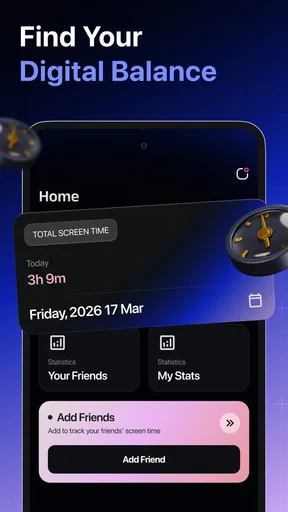
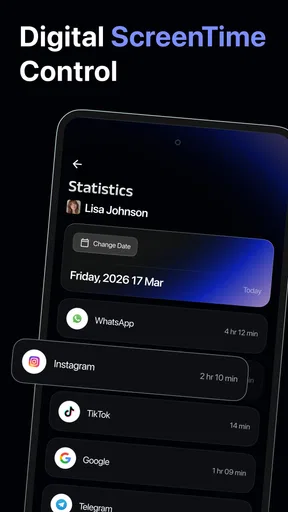
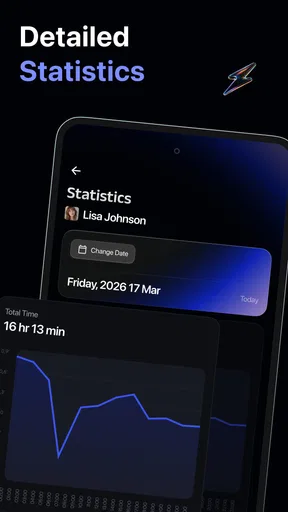
Another nifty feature is the screen time tracker. It’s eye-opening to see how much time I actually spend on my phone. With Screenza, I can set daily limits for specific apps, helping me stay focused on real-world tasks. It’s a gentle nudge towards healthier digital habits.
The app also offers a focus mode, which temporarily pauses notifications from all but your most essential apps. This is perfect when you need to get into the zone and concentrate on work or studies. It’s like having a digital bouncer, keeping distractions at bay.
Daily Use and Experience
After using Screenza for a week, I noticed a significant reduction in my screen time. The app sends me weekly reports, highlighting my usage patterns and suggesting improvements. It’s like having a personal coach cheering you on towards a more balanced digital life.
I particularly enjoy the app’s flexibility. You can customize almost everything to suit your needs. Whether you’re a busy professional or a student, Screenza adapts to your lifestyle. It’s as if the app understands that not all users are the same, and caters to individual needs.
Another aspect worth mentioning is the app’s impact on my mental well-being. With fewer distractions, I find myself more present and less stressed. It’s amazing how a little digital decluttering can have such a positive effect on my mood and productivity.
What to check before making it a routine
Because parenting tools often sit between personal habits and household expectations, I would start with one device and one clear purpose. For example, if I keep checking my phone while preparing dinner, I can review my activity after the meal and decide whether a notification change or a planned phone-free stretch would help. That small experiment is easier to evaluate than changing every setting at once, and it makes it clearer whether the app is actually helping.
I would also distinguish between a reminder and a rule. A tracker can make a pattern visible, but a parent still has to decide what response is fair, age-appropriate, and workable. If a child needs a phone for travel, accessibility, or contacting family, rigid limits may cause more trouble than they solve. A useful routine leaves room for those exceptions instead of treating every increase in use as a failure.
One non-obvious trade-off is that frequent checking can undermine the goal. If I open a dashboard several times a day to see whether my numbers have improved, the tracking itself becomes another reason to pick up the phone. I would choose a review time in advance and resist checking between those moments. That keeps attention on the habit I want to change rather than on monitoring the monitor.
Another practical tip is to make any goal behavioral rather than purely numerical. “Keep the phone away during homework” gives a family something concrete to try; “use it less” can feel vague and lead to arguments over what counts. Screen activity can help a person reflect, but the decision should connect to an everyday situation. I find that approach more likely to last because it explains why a change matters.
Cost, platform fit, and the final decision
Screenza is free to download, with in-app purchases ranging from around four to twenty dollars per item. I would begin with the free experience and only consider spending if I had used it long enough to identify a specific need. A purchase is not worthwhile simply because I want to feel more committed; it should unlock something I expect to use. That is especially important for parents managing several competing household expenses.
The app is from MOBİLEDO YAZILIM HİZMETLERİ, and its current version is 1.0.3. It is rated for Everyone and requires Android 8.0 or later. Its average rating is 4.5 from around 48,000 ratings, while the store shows over 100,000 installs. I see those figures as signs that people have tried it, not proof that its routines will suit every family. It was released on January 21, 2026, so I would also judge it by how well it meets my needs today rather than assuming it already covers every long-term use case.
The most important question is whether you want awareness or control. For personal reflection and a gentle prompt to notice screen habits, a dedicated app may make the process feel more intentional than occasionally glancing at a built-in dashboard. For blocking access, coordinating several family devices, or applying detailed rules, I would look for a purpose-built parental-control option and compare its controls carefully. Those are different jobs, and choosing the right one prevents disappointment.
A balanced recommendation
In summary, Screenza is more than just a tool; it’s an ally in the battle against digital overload. Whether you're looking to cut down on screen time or manage notifications better, this app has got you covered. By offering a suite of customizable features, Screenza helps you regain control over your digital life.
For anyone looking to balance their relationship with technology, I wholeheartedly recommend giving Screenza a try. It’s like having a personal assistant that’s always looking out for your best interests. Download it, explore its features, and enjoy the newfound freedom from digital distractions.
Where I would draw the line
My recommendation is strongest for someone who wants a low-pressure way to pay attention to their phone habits and is prepared to make the choices themselves. I would be more cautious if a family expects the app to settle disagreements, supervise a child without discussion, or replace a shared plan. Screen activity can inform those conversations, but it cannot decide what is reasonable for a particular household.
I also would not recommend treating a weekly report as a diagnosis of attention, wellbeing, or parenting quality. A pattern can be worth noticing without being a crisis. If reviewing usage makes someone feel judged or anxious, I would pause the tracking and focus on one specific routine instead. The best digital-health tool is one that helps people act with more intention, not one that makes them feel watched.
For me, the sensible test is simple: after trying the routine, do I understand one of my phone habits better, and have I made a change that feels sustainable? If yes, Screenza has served a useful purpose. If the process adds friction, leaves the family needing stronger controls, or does not fit the way someone accesses their device, the built-in tools or a different kind of parenting app may be the better choice.
Verdict
Strengths of Screenza
- User-friendly interface for quick access.
- Customizable widgets enhance functionality.
- Ad-free experience for uninterrupted use.
- Low battery consumption is a plus.
- Regular updates with new features.
Limitations of Screenza
- Limited themes compared to competitors.
- No offline mode for certain features.
- Some features locked behind paywall.
- Occasional crashes reported by users.
- Lacks integration with some third-party apps.
Similar Picks in This Category
View All
Family Space
Motorola Mobility LLC.3.9

شرطة الأطفال - مكالمة وهمية
Oub Apps4.1

Findmykids: Parental Control
LETEM LTD4.6

Pregnancy + | Tracker App
Philips Electronics UK Limited4.8

Policía de niños - para padres
Kids police4.7

Pregnancy App
Amila4.9
Frequently Asked Questions
What is Screenza and what does it do?
Screenza is a dynamic and user-friendly app designed to enhance your phone's visual experience. It offers a vast collection of high-quality wallpapers, themes, and widgets, allowing you to personalize your device with unique styles. Whether you're into minimalist designs or vibrant landscapes, Screenza caters to all tastes, providing a fresh look for your home and lock screens.
Is Screenza free to download and use?
Screenza is available as a free download on both Android and iOS platforms. While the app offers a variety of free wallpapers and themes, it also provides premium content that requires a subscription or one-time purchase. The free version includes occasional ads, whereas the premium version offers an ad-free experience and exclusive designs.
How often is new content added to Screenza?
Screenza regularly updates its library with new wallpapers, themes, and widgets to keep your device looking fresh and stylish. New content is typically added weekly, ensuring users have access to the latest trends and designs. Users can also enable notifications to stay informed about the latest updates and releases.
Can I use my own images as wallpapers in Screenza?
Yes, Screenza allows users to upload and use their own images as wallpapers, providing even more personalization options. The app supports various image formats and offers tools to adjust and crop images to fit your screen perfectly. This feature enhances your ability to customize your device according to your personal style and preferences.
Does Screenza affect my device's battery life?
Screenza is optimized to minimize battery usage by efficiently managing resources and reducing the strain on your device. While dynamic wallpapers may consume slightly more battery than static ones, the app provides options to adjust settings to minimize impact. Users can choose static images or adjust update frequencies to conserve battery life effectively.
